












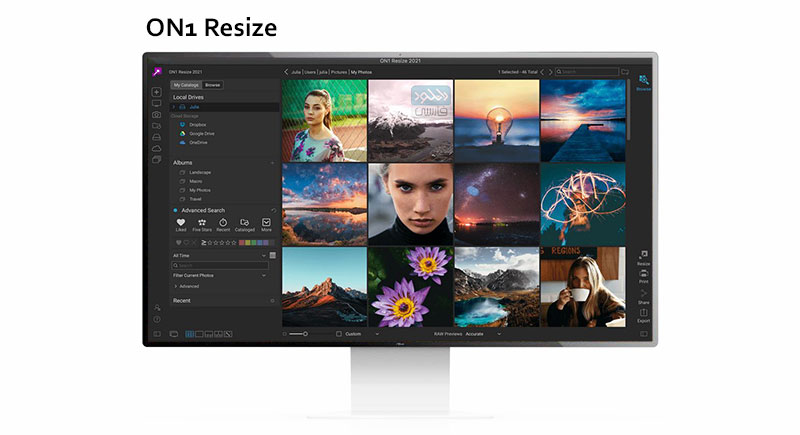
ON1 Resize
این نرم افزار یکی از بهترین نرم افزارهای ویرایش و مدیریت عکس ها با انواع فرمت ها می باشد. با استفاده از این نرم افزار شما می توانید به تمامی فایلهای تصویری و عکسهای خود در سیستم و همچنین در یسهای ذخیرهسازی ابری دسترسی پیدا کنید. شما با استفاده از این نرم افزار ها می توانید. تصاویر دلخواه خود را بدون اینکه کاهش کیفیتی در آنها مشاهده کنید تغییر سایز دهید. این نرم افزار در حال حاضر یکی از سریعترین و پرکاربردترین نرم افزارها در زمینه ویرایش و تغییر سایز عکس ها است. نرم افزار ON1 Resize دارای یک ماژول برای ویرایش عکس ها با فرمت RAW می باشد که از ویژگی های بارز این نرم افزار به شمار می رود. رابط کاربری این نرم افزار نیز در عین سادگی دارای ویژگی های فراوانی است که به کاربر امکان ویرایش و تغییر سایز عکس ها را به صورت دلخواه فراهم می آورد.شما هم اکنون می توانید نرم افزار ON1 Resize را با لینک مستقیم از سایت دانلود فارسی دریافت نمایید.-
ویژگی های نرم افزار ON1 Resize
- – توانایی تغییر سایز تصویر بدون از دست رفتن کیفیت و جزئیات به وسیله الگوریتم های داخلی
- – پشتیبانی از بیش از صد ها نمونه آماده برای چاپ تصویر مورد نظر در ابعاد دلخواه شما
- – پشتیبانی از موتور پردازشی قدرتمند برای تصاویر RAW و ارایه رنگ های بهتر و با کیفیت
- – توانایی ذخیره سازی فایل های psd فتوشاپ با نصف حجم و با کیفیت بالا
- – قابلیت چاپ تصاویر به صورت مستقیم از داخل نرم افزار و کنترل سایز ورق ، حاشیه ها و حالات پرینتر
- – توانایی دسترسی به تمامی عکس ها در سیستم ، فضای ابری ، شبکه به صورت کاملا آسان و مستقیم
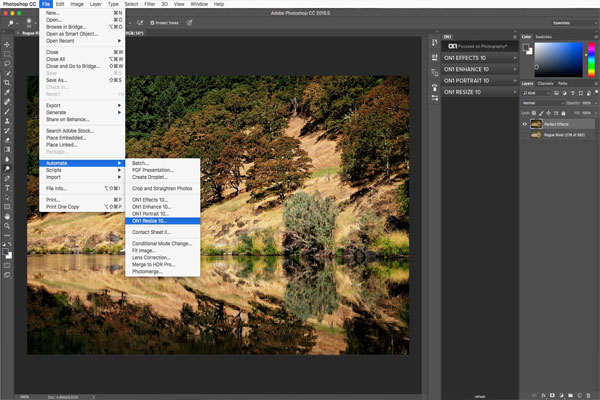
- – قابلیت کار کردن در قالب افزونه برای نرم افزار های Photoshop و Lightroom و به صورت یک نرم افزار مستقل
- ON1 Resize 2021 Features:
-
-
- – Patented, fractal-based interpolation algorithms — that quickly resize images without loss of sharpness or detail. Enlarge photos up to 1000%!
- – Hundreds of presets for desired print size
- – Resize 2019 features the new RAW processing engine from ON1 Photo RAW. It’s much faster and maintains better color and detail.
-
-
- – When saving out Adobe Photoshop PSD format files, they are compressed to half the size they used to be, losslessly.
- – You can print from right inside of Resize 2019. Control the paper size, margins and printer profiles for the ultimate print
- – Access your photos no matter where they are stored: your computer, your network, or on cloud-based storage services
- – ON1 Resize 2019 works as both a plug-in for both Photoshop and Lightroom and as a standalone application
-
-
به روز رسانی :
1401/02/17 نسخه ON1 Resize AI 2022.1 v16.1.1.12258 اضافه شد.

گالری تصاویر :


لینک دانلود
رمز فایل فشرده : www.download.ir
رمز کپی شد!
نرم افزار ON1 Resize 2022 v16.0.1.11291 نسخه ویندوز
نرم افزار ON1 Resize 2022.1 v16.1.1.12258 نسخه مک
- - پس از اکسترکت فایل دانلود شده توسط نرم افزار Winrar فایل ON1_Resize_2022.exe را اجرا کرده و مراحل نصب نرم افزار را انجام دهید.
- - پس از اتمام نصب محتویات پوشه Crack UZ1 را در محل نصب نرم افزار کپی و جایگزین فایل های قبلی نمایید.
- Minimum
- Operating System: macOS 10.14, 10.15, 11 / Windows 10, 11 / (current maintenance releases, 64 bit only)
- Processor: Intel Core i5, Xeon, or better processor(s) or Apple Silicon
- RAM: 8 GB
- Hard Drive: 1.5 GB for installation
- Graphics: OpenGL 3.3 compatible video card with 512 MB VRAM, DirectX 12, 1280x800 resolution (at 100% scale factor)
- Optional Integration:
- Photoshop CS6 and above
- Photoshop Elements 14 and above
- Photoshop Lightroom Classic 6 and above
- Apple Photos
- Affinity Photo
- Corel Paint Shop Pro
- Capture One 10 and above
- Internet: A high-speed internet connection and active account for ON1 360 syncing, activation, auto-update checking, content downloads, and tutorials.
- Supported Options:
- Supports pressure-sensitive tablets for controlling brush size and/or opacity.
- Supports ICC/ICM profiles for camera input, display, soft-proofing, and printing. Hardware display calibration tool is recommended.
- Recommended
- Operating System: macOS 10.15, 11 / Windows 10, 11 / (current maintenance releases, 64 bit only)
- Processor: Intel Core i5, Xeon, or better processor(s) or Apple Silicon
- RAM: 16+ GB
- Hard Drive: 1.5 GB for installation, SSD
- Graphics: OpenGL 4.2 compatible video card with 2+ GB dedicated VRAM, DirectX 12, 1920x1080 resolution (at 100% scale factor)
- Optional Integration:
- Photoshop CC 2021
- Photoshop Elements 2020
- Photoshop Lightroom Classic CC 2021
- Apple Photos
- Affinity Photo
- Corel Paint Shop Pro
- Capture One 10 and above
- Internet: A high-speed internet connection and active account for ON1 360 syncing, activation, auto-update checking, content downloads, and tutorials.
- Supported Options:
- Supports pressure-sensitive tablets for controlling brush size and/or opacity.
- Supports ICC/ICM profiles for camera input, display, soft-proofing, and printing. Hardware display calibration tool is recommended.

برچسب ها: