










Gexcon FLACS
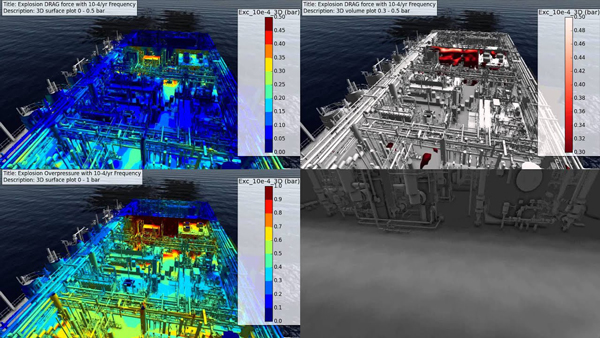
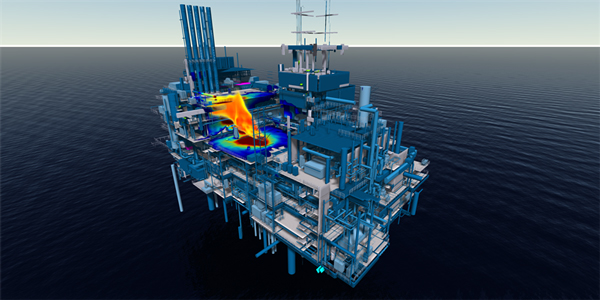
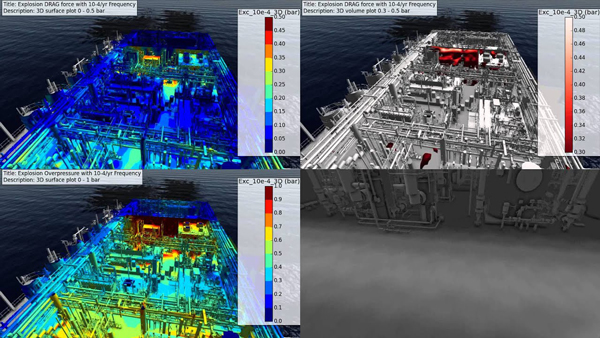
یک نرم افزار مهندسی و جامع برای مدلسازی سه بعدی انفجار ، پراکندگی و انتشار گازهای سمی و مواد قابل اشتعال میباشد . نرم افزار Gexcon FLACS برای مدلسازی انفجار و احتراق مواد قابل اشتعال با استفاده از دینامیک سیالات محاسباتی مورد استفاده قرار میگیرد تا با این کار امنیت فیزیکی بهتری را برای محیط های صنعتی به ارمغان بیاورد. این نرم افزار در صنایع نفت و گاز و به طور فزاینده ای در صنعت هسته ای که پتانسیل بالایی در انفجار و پراکنش گرد و غبارها و مواد سمی دارد مورد استفاده قرار میگیرد . این نرم افزار برای مدلسازی و ترکیب آن با توانایی های گرافیک سه بعدی ، نتایج دقیقی را امکان پذیر میکند و امکان درک بهتر و دقت بالاتر نتایج ، و باعث افزایش سطح امنیتی میشود .ویژگی های نرم افزار Gexcon FLACS :
توانایی مدلسازی یکپارچه انفجار و پراکنش گازها و مواد سمی
نمایش عواقب ناشی از حوادث به صورت کاملا سه بعدی
ویرایش دستی و کارآمد ساختارهای هندسی
بررسی ترکیبات گازی
روشهای دو بعدی، سه بعدی، انیمیشنی، خروجی متنی برای نمایش نتایج
FEATURES
- Ability to seamlessly model the explosion and dispersion of gases and toxins
- Displays the consequences of events in full in 3D
- Manual and efficient editing of geometric structures
- Two-phase modeling
- Investigation of gas compounds
- Modeling Transient Events (Time Dependent)
- Includes side effects and prevention measures
- Valid and accurate results
- Different methods for displaying results (2D, 3D, animation, text output)
- A better understanding of the phenomena
- Comprehensive software guide
گالری تصاویر :


لینک دانلود
لینک های دانلود
رمز فایل فشرده : www.download.ir
رمز کپی شد!
نرم افزار Gexcon FLACS v9.0
راهنمای نصب
- - ابتدا تمام پارت های نسخه مربوطه را دانلود کرده و سپس با استفاده از برنامه Winrar آنها را استخراج نمایید . (راهنمای اکسترکت کردن فایل ها)
- - اگر هنگام اکسترکت کردن فایل های زیپ شده با ارور هایی از قبیل CRC یا Password مواجع شدید می توانید با استفاده از این راهنما فایل ها را تعمیر کنید .
- - آنتی ویروس سیستم را خاموش کنید .
- - فایل نصب Gexcon FLACS_setup را اجرا کرده و مراحل نصب را کامل کنید .
- - از پوشه fix فایل crack را copy و در محل نصب نرم افزار paste و جایگزین کنید .
- Since May 27, 2016, FLACS v10.5r1 has been available. It is delivered for Microsoft Windows and for Linux.
- FLACS v10.5r1 has been tested on the following platforms (64 bit):
- Windows 7
- Windows 8.1
- Windows 10
- openSUSE 13.1, 13.2, 42.1
- CentOS 5.x, 6.5, 7
- Ubuntu 12.04, 14.04, 16.04
- Fedora 21, 22, 23
- Debian 7, 8
- Red Hat Enterprise Linux 5.x and 7.x is expected to be FLACS v10.5r1 compatible since it is compatible with CentOS 5.x and 7.x, respectively.
- It is also possible that FLACS runs on other Linux distributions or versions, too. Please
- contact flacs@gexcon.com if you experience problems installing or using FLACS on a specific distribution or
- version.
- Processor architecture: AMD64 / Intel 64 / x64 (64 bit) are supported. Intel IA64 (Itanium) is not supported.
- Internal memory: 2GB or more recommended.
- Free hard drive capacity: 1 GB for software installation and typically 100 GB for simulation data.
- Graphics card: a graphics card with NVIDIA chip set is recommended. Graphics cards using, for example, AMD
- or Intel chipsets may work, but support and testing are limited to NVIDIA.
- For Flowvis 5, it is recommended to use the latest graphics driver version available for the target hardware.
- Flowvis 5, a graphics card / driver that supports OpenGL version 3.3 or higher is required to use the full 3D
- version in Flowvis 5. If insufficient OpenGL support is detected, Flowvis 5 will still run, but the full 3D type might
- not work. Installing a recent graphics driver may solve this problem. Check the web site of your local hardware
- for relevant updates.
