

RawDigger
نام نرم افزاری کاربردی در زمینه ویرایش تصاویر می باشد که به شما امکان می دهد تا بتوانید تصاویر و فیلم های ضبط شده توسط دوربین های عکاسی و فیلم برداری را مشاهده ، ویرایش ، آنالیز نموده و به عمق تصاویر خام دوربین های عکاسی نفوذ نمایید. همچنین به شما امکان می دهد تا بتوانید بدون تبدیل کردن عکس های RAW بتوانید به تصحیح رنگ ها بپردازید همچنین به شما امکان می دهد تا بتوانید داده های استفاده شده توسط مبدل ها را مشاهده نموده تا به جای این که به تبدیل آن ها بپردازید.نرم افزار RawDigger
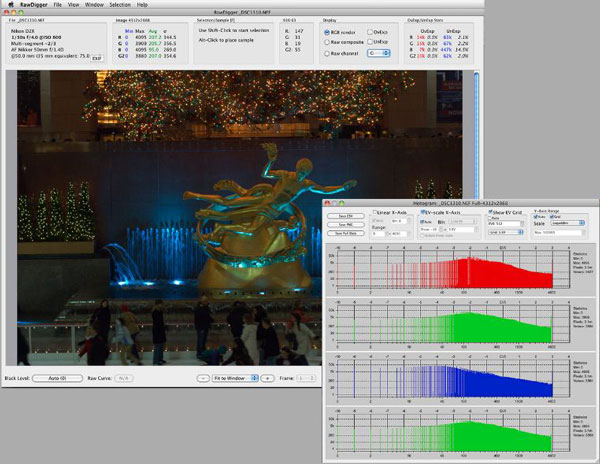
توانایی نمایش یک histogram واقعی از فایل های خام که بسیار تفاوت زیادی نسبت به نمایشگر دوربین و بسیاری دیگر از مبدل های تصاویر RAW را دارا می باشد. همچنین با پشتیبانی از نمایشگر نور دهی بیش از حد شما را قادر می سازد تا بتوانید بخشی از تصویر را که نور بیشتر از حدی را ثبت نموده کنترل نمایید.-
ویژگی های نرم افزار RawDigger:
- توانایی تعیین تنظیمات مختلف برای جلوگیری از نور دهی بیش از حد
- توانایی مقایسه نتایج اندازه گیری و تطابق مقادیر فایل های RAW
- توانایی مقایسه histogram ها بوسیله استفاده از تکنولوژی ETTR
- توانایی تعیین سطح سایه ، نور دهی ، تنظیم رنگ در عکس ها
- پشتیبانی از دقت بالا در هنگام تعیین یکنواختی نور در پیش تولید عکس ها
- امکان راهنمایی عکاسان برای استفاده از فیلتر درست و مورد نیاز برای دریافت بهترین تصویر و سایه ها
- توانایی تعیین افکت و فیلتر های مناسب برای عکاسان طبیعت به منظور طبیعی تر کردن عکس های ثبت شده
- توانایی مقایسه داده اصلی فایل RAW با نسخه تبدیل شده و تعیین ویژگی های دوربین عکاسی
- Features of RawDigger
- Displays the real histogram of the raw data, which greatly differs from the in-camera histogram and histograms presented by most of the
- raw converters.
- Overexposure (OE) indicator will show you exactly what areas of the shot are blown out and in which color channel(s) it happened (best
- if used in channel view).
- Allows determining how exposure meter is calibrated and what raw level corresponds to the midpoint of in-camera histogram. That is,
- RawDigger lets you establish the headroom in highlights and obtain optimal exposures.
- For ETTR practitioners, RawDigger makes it very simple to compare raw histogram to in-camera histogram and account for the difference,
- making the exposures as much “to the right” as possible.
- Helps determining the raw level at which the overexposure “blinkies” start on the camera LCD and to know how much headroom is still
- available after the blinkies start showing.
- If the shadows look blotchy, colorless, or details in shadows are poorly resolved you will be able to determine how much they are
- underexposed and set Underexposure (UE) indicator in RawDigger accordingly.
- A useful tool for examining how the relative per-channel underexposure depends on the color of light.
- More precise than any exposure meter for the purpose of evaluation of the uniformity of fill light and reproduction light setups (in terms of
- the evenness of both color balance and luminosity across the background).
- For studio photography RawDigger helps establishing the proper light filtration to achieve the cleanest possible shadows on the shots.
- Landscape photographers may want to use RawDigger to determine the effect of the filters on the lens, to check neutrality of polarizing
- and neutral density filters and, possibly, to select color correction and color compensation filters to use in different light.
- Can be used to check the amount of vignetting caused by the lens and the sensor.
- Helps determine the idiosyncrasies of both camera and raw convertor by providing a true view into the raw data and comparing it to the
- results obtained through raw conversion.
به روز رسانی :
1400/01/02 نسخه RawDigger Profile Edition v1.4.3.704 اضافه شد.

گالری تصاویر :


لینک دانلود
لینک های دانلود
رمز فایل فشرده : www.download.ir
رمز کپی شد!
راهنمای نصب
- ابتدا نرم افزار را دانلود نموده و سپس به کمک نرم افزار Winrar آن را از حالت فشرده خارج کنید .
- سپس فایل Setup.exe را اجرا نموده و مراحل نصب را تا انتها ادامه دهید .
- پس از اتمام نصب نرم افزار را اجرا نکنید .
- سپس فایل موجود در پوشه Crack را در مسیر نصب نرم افزار کپی کنید .
- سپس نرم افزار را اجرا کنید .
- Supported OS: Windows 7/8/10
- Processor: Pentium IV or higher
- RAM: 1 GB RAM (2 GB recommended)
- Free Hard Disk Space: 200 MB or more