SoftInterface Convert Document to Image
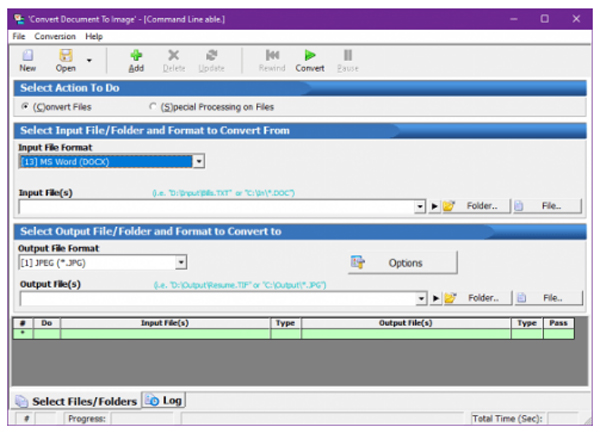
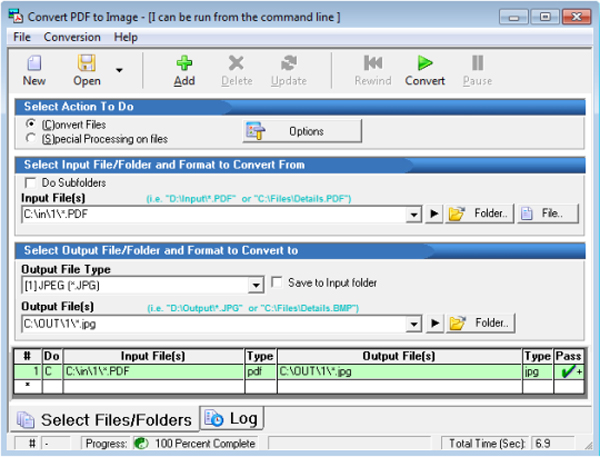
یک نرم افزار قدرتمند و کاربردی تبدیل فایل های Document به عکس میباشد ، نرم افزار SoftInterface Convert Document to Image میتواند به راحتی فایل های Document خود با فرمت های رایج نظیر DOC, PDF, TXT یا RTF به عکس تبدیل کنید . این نرم افزار از فرمت های تصویری مانند JPG, BMP, TIF پشتیبانی کاملی دارد .ویژگی های نرم افزارهای SoftInterface Convert Document to Image :
انواع پرونده های ورودی شامل DOC ، DOCX ، PDF ، TXT ، RTF و HTM
تبدیل به PDF یا PDF / A-1b ، استاندارد OSI موجود
اجرای رابط کاربری گرافیکی
پردازش ویژه روی پرونده ها از جمله پیوست / الحاق ، حذف خطوط خالی ، راه اندازی برنامه های شخص ثالث ، جستجو و جایگزینی رشته ها
تبدیل به تصویر ، سند ، صفحه و پاراگراف
تنظیمات پیچیده تبدیل
می توانید تایمر را تنظیم کنید تا کارها در یک بازه زمانی مشخص به صورت خودکار انجام شود
پرونده های نمایشی و مشاغل تبدیل همراه با نصب
Features of SoftInterface Convert Document to Image 14
- Input file types include DOC, DOCX, PDF, TXT, RTF, and HTM.
- Output image file types supported: JPEG Joint Photographic Expert Group file format, TIFF Tagged-Image File Format, BMP Standard Windows Bitmap file format, GIF
- Graphics Interchange file Format, EMF Enhanced Windows Metafile format, PDF or PDF/A, J2K Jpeg 2000 File Format, PCX ZSoft Paintbrush File Format, PNG Portable
- Network Graphics file format, RAS Sun Raster Image File Format, TGA Truevision Targa File Format, WMF standard Windows Metafile format.
- Convert to PDF or PDF/A-1b, OSI standard available
- Command line (invisible at runtime) and Graphical User Interface execution
- Special processing on files including appending/concatenation, removing empty lines, launching third party programs, search and replace strings
- Format the document, page and paragraph before conversion to an image
- Save and restore complex conversion configurations, known as conversion jobs
- Timer can be set to run jobs automatically at a specified interval
- Demonstration files and conversion jobs included with the installation


گالری تصاویر :
لینک دانلود
لینک های دانلود
رمز فایل فشرده : www.download.ir
رمز کپی شد!
نرم افزار SoftInterface Convert Document to Image v14.10
راهنمای نصب
- - ابتدا تمام پارت های نسخه مربوطه را دانلود کرده و سپس با استفاده از برنامه Winrar آنها را استخراج نمایید . (راهنمای اکسترکت کردن فایل ها)
- - اگر هنگام اکسترکت کردن فایل های زیپ شده با ارور هایی از قبیل CRC یا Password مواجع شدید می توانید با استفاده از این راهنما فایل ها را تعمیر کنید .
- - آنتی ویروس سیستم را خاموش کنید .
- - فایل نصب SoftInterface Convert Document to Image_setup را اجرا کرده و مراحل نصب را کامل کنید .
- - از پوشه کرک فایل crack را copy و در محل نصب نرم افزار paste و جایگزین کنید .
- Supported OS: Windows 7/8/10
- Processor: Pentium IV or higher
- RAM: 1 GB RAM (2 GB recommended)
- Free Hard Disk Space: 200 MB or more